
Claude Code Best Practices: A Starter Kit for Beginners
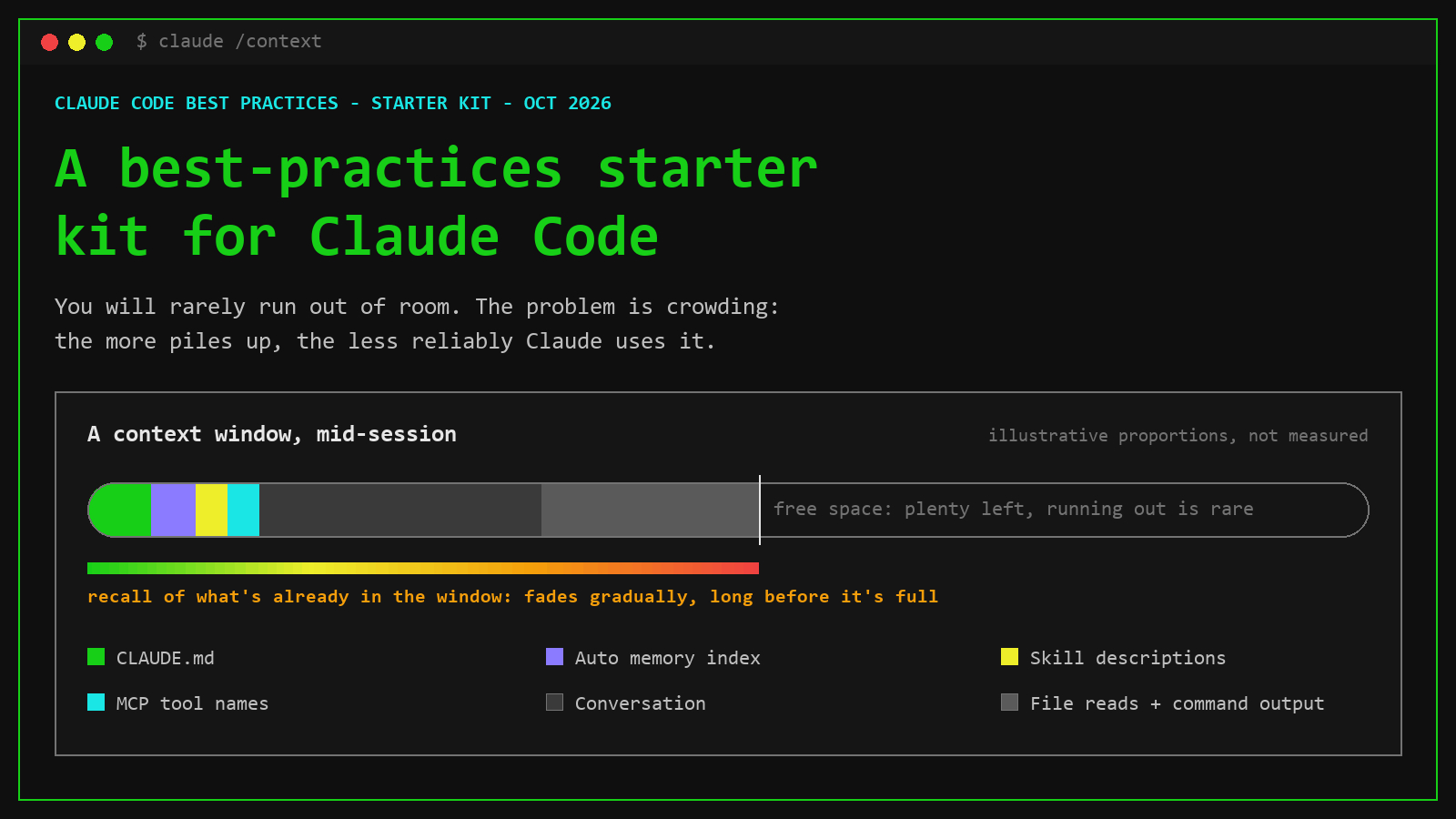
Claude Code is an AI assistant that works inside your project folder. It reads your files, runs commands, and edits code. That makes it a different tool from chatting with Claude on claude.ai; the comparison below shows which parts of this guide apply to each. If you are new to it, two things will surprise you sooner or later: it sometimes states something confidently that isn't true, and it gets less sharp the longer a session runs.
Both come from the same place, the context window. This guide explains that idea in plain language, then shows how memory and extensions decide what goes into it.
Think of it as a best-practices starter kit. Everything in it is meant to be used, not just read:
- Starter files to copy: a CLAUDE.md, a lessons log, a changelog, and a handoff note.
- A Git setup you can finish in ten minutes, and how it connects to GitHub.
- Best practices in two tiers: beginner habits for today, advanced ones for later.
- Prompts with copy buttons for the situations you'll hit in your first week.
Use the contents list to jump straight to what you need.
- Claude predicts likely text. Claude Code can look things up with its tools, but it often answers without checking. When it lacks the real answer, it can produce a believable one. That's a hallucination.
- A crowded session makes this worse. Even with room to spare, the more that piles up, the less reliably Claude uses what's in it. That's context rot.
- Memory files carry knowledge between sessions, but they are requests, not rules. Only what Claude Code itself enforces, such as hooks and deny rules, is guaranteed.
- Start simple: a short CLAUDE.md, a test command Claude can run, one task per session, and proof before you accept "done."
- Let your project remember: a lessons file, a changelog and a plan file turn corrections into rules and let a new session catch up.
- Start fresh often. Hand off with a short written note, not a long chat.
Words you'll see
| Term | What it means |
|---|---|
| Session | One conversation with Claude Code, from when you start it until you clear it or quit. |
| Token | A chunk of text, roughly three quarters of a word. Size limits are measured in tokens. |
| Context window | Everything Claude can "see" in this session: your instructions, the conversation, every file it read and every command output. |
| CLAUDE.md | A plain text file of instructions for your project that Claude reads at the start of every session. |
| Hallucination | An answer that sounds right but isn't true. |
| Context rot | Claude getting worse at using what's in the window as more piles into it, long before the window is actually full. |
Claims carry a tag: Certain means stated in Anthropic's documentation. Likely means published research or widely accepted practice.
Claude Code vs Claude chat: which one is this about?
Both use the same Claude models, from the same company, often under the same subscription. They are different tools, though, and this guide is about Claude Code. Some ideas below carry over to chat; the files and commands don't.
Claude chat
- Where: claude.ai in a browser, the Chat tab of the Claude desktop app, and the mobile app.
- Works with what you give it: what you type or paste, files you upload, and on desktop, folders you choose to share.
- Remembers through the app: Projects (shared instructions and files) and the memory setting under Settings.
- Best for: questions, writing, analysis, research, documents.
Claude Code
- Where: the terminal (
claude), the VS Code and JetBrains extensions, the Code tab of the desktop app, and claude.ai/code for cloud sessions. - Works on its own inside a folder: opens files, runs commands and tests, edits code, and can roll back with
/rewind. - Remembers through files: CLAUDE.md, auto memory, and the
.claude/folder (settings, rules, skills, hooks). - Best for: building, fixing and testing software, or any task that needs files and commands.
/clear, and a Project's instructions do the job of CLAUDE.md. Likely
How each section of this guide applies
| Section | Claude chat | Claude Code |
|---|---|---|
| 01 Context window | Applies. Long chats and big uploads fill the window too. | Applies |
| 02 Hallucinations | Applies. Same causes and warning signs; in chat they're more often invented facts, quotes and sources. | Applies: invented files, functions, packages |
| 03 Context rot | Applies. The fix is starting a new chat. | Applies: /clear |
| 04 Memory | Different. Projects and the memory setting replace CLAUDE.md and auto memory. | Applies |
| 05 Extensions | Partly. Connectors and skills exist in the apps; hooks, subagents and plugins as described here are Claude Code features. | Applies |
| 06 Beginner habits | The ideas carry over: be specific, attach the source, ask for proof, one topic per chat. The commands don't. | Applies |
| 07 Git and GitHub | Not directly. Chat can explain Git commands, but it doesn't run them in your project. | Applies |
| 08 Project habits | Mostly not. These are files inside a code project. | Applies |
| 09 Fresh sessions | Applies. Start a new chat and paste a short summary; a Project keeps your files across chats. | Applies |
| 10 Level up | Only the long-material tips: documents first, question last, quotes before answers. | Applies |
| 11 Prompts | "Prove it," "Stop guessing" and "Explain before I accept" work in chat with small wording changes. | Applies |
Claude's working memory for one session
Claude doesn't remember your project between sessions on its own, and it can't see anything that isn't in the window. The bar at the top of this post shows a typical session: a little loaded up front, a lot added as you work, and plenty of room to spare.
Session starts
Your CLAUDE.md files, Claude's memory notes, and the names of available skills and tools load first.
You work
Every message, every file Claude reads and every command output is added on top.
It gets compacted
On a long session, Claude Code summarizes older parts to make room. A summary keeps the gist, not every detail.
When Claude sounds sure, and is wrong
A hallucination is text that reads as correct but is factually wrong or doesn't match the information it was given. Anthropic says plainly that even its most advanced models can do this.
In Claude Code it usually looks like a file, function, setting, package or command option that doesn't exist, or a claim that something works when nothing was run to prove it.
Certain · Anthropic docsHow it happens
You ask
A request, with or without the files it needs.
It predicts
It builds the answer from patterns, one likely word at a time.
It sounds right
Plausible is not the same as true. That gap is the problem.
Pattern, not a lookup
It learned how code and language usually look. A line that fits the pattern can come out whether or not the thing it names exists.
Gaps get filled
New library versions, niche tools and your company's internal code are thin or missing in what it learned, so it can fill the hole with something believable.
Nobody said "I don't know" was okay
Anthropic's guidance is to give Claude explicit permission to admit uncertainty. That one instruction can sharply cut false answers.
It didn't read the file
Claude Code can open any file in your project, but only does when it thinks it needs to. If it skips that step, it describes what the file probably says.
Four signs to double-check
Names you've never seen
A helper, file, setting or command option you don't recognize from your own project.
Things that don't resolve
A package that won't install, a doc link that won't open, an import that won't compile.
Sure about new or niche
Zero hedging about last month's library release or your company's internal tools.
The story changes
Ask the same question in a fresh session and the specifics come back different.
Heuristics, not proof. Confidence: Likely (common practitioner guidance, not an Anthropic guarantee).
Long sessions make it worse
A missing file is one cause. Context rot is the opposite problem: the information is in the window, and Claude still doesn't use it well. Anthropic's engineers describe it directly: as the number of tokens grows, "the model's ability to accurately recall information from that context decreases."
Researchers at Chroma tested 18 models in 2025 and found performance "consistently degrades with increasing input length," even on simple tasks. This starts long before the window is full.
Certain · Anthropic engineeringHow it occurs
Attention is a budget
Every token can relate to every other token, so n tokens means n² relationships. Each one you add spends part of a finite budget, and what matters gets spread thinner.
Less practice with long inputs
Models learn from data where short sequences are more common than long ones, so they have less experience connecting facts that sit far apart.
The middle gets lost
Liu et al. (Stanford, 2023) found models use information best at the start or end of the input and worst in the middle, even models built for long inputs.
Look-alikes compete
Chroma found even one distractor, text that resembles the answer but is wrong, reduced accuracy. A long coding session is full of them: old versions of the same file, earlier failed attempts, similar error messages.
Why it leads to hallucinations
A hallucination is plausible text filling a gap. Context rot creates the gap inside your own session: the right detail is technically there, recall of it slips, and Claude falls back on what usually comes next. The result is an answer "inconsistent with the given context," the second kind of hallucination in Anthropic's definition.
Session grows
Long chat, big files, many near-duplicates.
Recall slips
The right detail gets less attention than it needs.
Pattern fills in
A likely value replaces the one you gave it.
Still sounds sure
Fluency doesn't drop when accuracy does.
- Confidence doesn't track recall. In Chroma's tests some models gave "confident but incorrect responses when distractors are present." Claude models more often declined to answer when unsure, but that is a tendency, not a guarantee. Likely · research
- Rules typed into chat fade. An instruction from early in a long session ends up in the middle, the part models use least. Rules that matter belong in a file or a hook. Likely
- Failed attempts pile up. Anthropic notes that after two failed corrections, a third "mostly adds to a conversation that already contains two failed attempts for Claude to keep re-reading." Certain
What carries over between sessions
Every session starts with an empty window. Two mechanisms carry knowledge forward, and both load at the start of every session. Claude treats both as context to follow, not as enforced settings.
CLAUDE.md
- Instructions and rules: test commands, conventions, gotchas.
- Loaded in full every session, from your folder and every folder above it.
- Files in subfolders load when Claude works there.
- Keep it under 200 lines. Shorter and more specific gets followed more reliably.
Auto memory
- Notes Claude takes from your corrections and preferences.
- Stored per project in
~/.claude/projects/<project>/memory/ - The first 200 lines or 25KB of
MEMORY.mdload each session; detail files load when needed. - On by default when you run Claude Code locally. Browse it or turn it off with
/memory.
Saying "remember that the API tests need Redis" saves to auto memory. Saying "add this to CLAUDE.md" puts it in the file you control. Certain · Claude Code docs
Where CLAUDE.md files live, broadest to narrowest
Managed policy
/etc/claude-code/CLAUDE.mdOrganization-wide, set by IT. Different path on macOS and Windows.
Project
./CLAUDE.mdShared with the team through git.
User
~/.claude/CLAUDE.mdYour preferences, in every project.
Local
./CLAUDE.local.mdJust you, this project. Add it to .gitignore.
/init drafts a CLAUDE.md from your code
/memory opens your memory files
/context shows what actually loaded
Which tool for which problem
You don't need any of these on day one. Each has a clear moment when it becomes worth adding. The cost column isn't about running out of room. Whatever loads on every request is more for Claude to read and weigh on every task, relevant or not, and more usage on your plan.
Beginner habits you can use today
No setup beyond one short file. Each habit targets one of the problems above.
Run /init, then cut it down
/init writes a starter CLAUDE.md from your code. Delete what Claude could work out by reading the repo. Keep test commands, gotchas, and anything you've had to correct twice.
Give it a check to run
Tell it how to test: "run the auth tests after, and keep going until they pass." A pass/fail check lets Claude catch its own mistakes instead of you.
Ask for proof, not "done"
Ask for the command it ran and the output. Anthropic: "All tests pass" on its own "tells you very little." Then read the diff before you keep it.
Be specific, hand it the file
Name the file, describe the symptom, say what "fixed" looks like. Type @ and a path to put the actual file in front of Claude instead of describing it.
Plan before big changes
Press Shift+Tab until you reach plan mode, or start a prompt with /plan. Claude researches and proposes without editing anything until you approve.
One task per session
Run /clear when you switch to something unrelated. It costs nothing, and the next task doesn't inherit the last one's clutter.
Stop, undo, restart
Esc stops Claude mid-action. /rewind (or Esc twice on an empty prompt) opens a menu where you roll back the code, the conversation, or both. After two failed corrections, /clear and write one better prompt.
Save rules, don't just say them
When a rule matters beyond this task, say "add this to CLAUDE.md." A rule typed into chat disappears with /clear and fades in a long session.
# Commands
- Install: <your install command>
- Run one test file: <your test command> path/to/file
- Lint / typecheck: <your command>

# Working rules
- If you're not sure, say so. Don't guess file, function, option or package names; check the repo first.
- Read a file before you describe or change it.
- After a change, run the relevant tests and show me the command and its output.

# Gotchas
- <anything you've had to correct twice>
Old habits you can skip
| You may have read | What to do instead |
|---|---|
| Write IMPORTANT or ALL CAPS on rules Claude misses | Plain wording works. If a line keeps getting missed, the file is too long, or the rule should be a hook. |
| Add "think harder" or "be thorough" | Those are ordinary words, not switches. Effort level is the real control. |
| Tell it "keep going, don't be lazy" | Give it a check to pass instead. Nagging tends to cause over-work. |
| Describe your folder layout in CLAUDE.md | Claude reads the repo itself. Only write what isn't in there. |
Source: Anthropic's "What you can stop doing" list in the Claude Code best practices.
Your safety net: Git, and where GitHub fits
Git keeps a history of save points for your project folder, on your own computer. GitHub is a website that keeps a copy of that history online. You need Git to work safely with Claude Code; GitHub is optional until you want a backup, a second machine, or other people.
Git
- Free, works offline, and keeps its history in a hidden
.gitfolder inside your project. - A commit is a save point: a snapshot of your files plus a message saying what changed.
- Any commit can be compared with or restored later, even weeks after the session that made it.
- Claude Code runs Git commands for you, so you can ask in plain words.
GitHub
- Hosts a copy of your repository. GitLab and Bitbucket do the same job.
- Push sends your commits up; pull brings other people's commits down.
- Pull requests let someone review a set of changes before they land on
main. - GitHub Actions can run your tests, or deploy your site, on every push.
/rewind undoes changes within a session, but it doesn't restore files changed only by shell commands, and Anthropic calls checkpoints "not a replacement for version control." A commit before each big request means any mistake is one command away from undone. Certain · Claude Code docs
One-time setup
Install Git
From git-scm.com. On Windows that's Git for Windows, which Claude Code also uses.
Introduce yourself
Your name and email go on every commit. Set them once per computer.
Start the repo
In your project folder: create it, list what to ignore, make the first commit.
Connect GitHub
Optional. Create an online copy and push to it.
# 2. once per computer
git config --global user.name "Your Name"
git config --global user.email "you@example.com"
git config --global init.defaultBranch main

# 3. once per project, inside the project folder
git init
#    create .gitignore listing: .env, node_modules/, build output, CLAUDE.local.md
git add .
git commit -m "chore: initial commit"

# 4. optional: connect GitHub with the GitHub CLI
#    (install the GitHub CLI from cli.github.com first)
gh auth login
gh repo create my-project --private --source=. --push
Or let Claude do step 3 and watch what it runs:
Set up Git for this project: create a .gitignore for [language] that excludes secrets, dependencies and build output, make the first commit, then show me git status and git log --oneline. Don't push anything.The everyday commands
| Command | What it does |
|---|---|
git status | Lists what changed since the last commit. Run it often. |
git diff | Shows the exact lines that changed. Read it before you commit Claude's work. |
git diff --staged | Shows the changes you've already picked with git add, which plain git diff leaves out. |
git add <file> | Picks the changes that go into the next commit (git add . picks everything). |
git commit -m "fix: ..." | Saves a snapshot with a message. |
git log --oneline | Lists your save points, newest first. |
git switch -c try-cache | Starts a branch: a separate line of work you can merge or throw away. |
git restore <file> | Throws away unstaged edits to a file. There is no undo for this one. |
git push / git pull | Sends your commits to GitHub / brings others' commits down. |
How Git, GitHub and Claude Code work together
Commit before big asks
A clean starting point makes "undo all of that" a single command. Ask Claude to commit in small, logical steps with clear messages.
Push is the public step
Commits stay on your machine until you push, and a push can trigger deploys. Ask Claude to check with you first, and add "ask": ["Bash(git push *)"] under permissions in .claude/settings.json. That catches the usual form; a push written another way, or one made through gh, isn't matched, so treat it as a guard rail, not a lock.
Branches and pull requests
For team work, have Claude work on a branch and open a pull request with gh pr create. Teammates review on GitHub before it reaches main.
Anything you push to GitHub should be treated as permanent, even if you delete it later. If a secret is ever pushed, change the secret, don't just delete the file. Likely · practice
Show me git status, git diff and git diff --staged, then commit these changes in small, logical commits with clear messages. Don't push.Files that make every session smarter
Chat disappears when you run /clear. Files in your project don't. A few plain text files turn one-off corrections into lasting improvements and let a fresh session pick up where the last one stopped. Section 09 covers the move from one session to the next.
my-project/
├── CLAUDE.md               rules Claude needs every session (short)
├── CLAUDE.local.md         your personal notes, kept out of git
├── README.md               how to run the project, for people
├── CHANGELOG.md            what changed and when, newest first
├── .gitignore              files Git should never save (.env, build output)
├── tasks/
│   ├── todo.md             the current plan as a checklist
│   └── lessons.md          each correction and the rule it produced
├── docs/decisions/         short notes on choices the code can't explain
└── .claude/
    ├── settings.json       shared permissions and hooks (committed)
    ├── settings.local.json your own overrides (kept out of git)
    ├── rules/              extra instructions; add paths: to load one only for matching files
    └── skills/             repeatable playbooks
The correction loop
Every time you correct Claude, you learn something about your project that Claude can't see in the code. Anthropic puts it directly: "A repeated mistake or a recurring review comment is a CLAUDE.md edit, not a one-off correction in chat." Certain A lessons file is the step before that edit: it records what went wrong and why, so you can spot the pattern.
You correct it
In chat. Fixes this one task, then fades.
Log the lesson
One entry in tasks/lessons.md: what happened, and the rule that prevents it.
Promote the rule
Happened twice? Move the rule into CLAUDE.md as one plain line.
Enforce it
Must never happen again? Make it a hook or a deny rule (section 10).
Why a separate file when Claude already has auto memory? Auto memory is Claude's own notes, stored on your machine only. tasks/lessons.md lives in the project: you can read it, edit it, review it in a pull request, and your teammates and their sessions get it too. Prune it as you go. Once a lesson becomes a CLAUDE.md line, the long story behind it can be shortened or archived. Likely · practice
Six more project habits
Keep a changelog
CHANGELOG.md, newest first, with an [Unreleased] section at the top and changes grouped as Added, Changed, Deprecated, Removed, Fixed or Security (the Keep a Changelog format). A new session reads the top and knows what changed recently. Ask for the entry in the same commit as the change.
Keep the plan in a file
tasks/todo.md holds the current plan as a checklist that Claude ticks off as it goes. If a session ends or gets cleared mid-task, the next one reads the list and carries on. Add a short review at the end: what was done and what was verified.
Commit small and often
One working step per commit, with a message that says what and why, such as fix: null check on booking lookup. Section 07 covers setup and the everyday commands.
Share config, keep personal files personal
Commit CLAUDE.md and .claude/settings.json so the whole team gets the same rules, permissions and hooks. Keep CLAUDE.local.md and .claude/settings.local.json out of git; Claude Code excludes the local settings file automatically when it creates it.
Keep secrets out of reach
Put .env in .gitignore, and add deny rules: "deny": ["Read(./.env)", "Read(./.env.*)"] under permissions in your settings file. They block Claude's file tools and common shell reads like cat, but not a script that opens files itself, so keep production secrets out of the project folder altogether.
Write down decisions, run checks in CI
A one-page note per decision in docs/decisions/ (why this database, why no ORM) answers questions the code can't; hand it over with @ when relevant. Run the same tests in CI on every push. On this site, a deploy only counts as done once the live site shows the new version number.
Templates
## 2026-10-30 - Ran the whole test suite
**What happened:** A one-line fix triggered
all 2,400 tests (9 minutes).
**Rule:** For a one-file change, run that
file's tests first: npm test -- path/to/file## [Unreleased]
### Added
- Rate limiting on the login route
### Fixed
- Session timeout no longer logs users
out mid-checkout
## [1.4.0] - 2026-10-21
...# Project files
- At the start of a task, read tasks/lessons.md and tasks/todo.md.
- After I correct you, add an entry to tasks/lessons.md: what happened, and the rule that prevents it.
- Every user-facing change gets a line in CHANGELOG.md under [Unreleased], in the same commit.
- Commit in small steps with messages like "fix: null check on booking lookup". Ask before pushing.Version numbers follow Semantic Versioning (MAJOR.MINOR.PATCH: breaking change, new feature, fix). Commit prefixes such as feat, fix, docs and refactor come from Conventional Commits. Both are conventions, not Claude Code requirements.
When to start over, and how to hand off
A new session is cheap to start, and a stale one gets more expensive the longer it runs. The skill is knowing when to keep going, when to compress, when to start clean, and how to carry the work across without carrying the clutter.
Which move, when
/compact keep the API changes and test commands, or /rewind and choose "Summarize from here"/clear, or open a new terminal window and run claude/clear, then one better prompt that includes what you learned/branch to fork the conversation and keep the original intact/rename auth-fix; later run claude --resume auth-fix (or claude --continue for the latest)Commands from Anthropic's Claude Code best practices and checkpointing docs. Certain
How to hand off
Resuming an old session brings back everything, including the clutter. A handoff carries only what matters: a short note written by the session that did the work, read by a fresh one. Likely · practice
Write it down
Ask Claude to write tasks/handoff.md using the template below.
Commit
Save the work and the note together, so nothing lives only in the chat.
Start fresh
/clear, or a new window, today or next week.
Pick it up
The new session reads the note and tells you the next step before it acts.
## Goal
What we're building and what "done" means.

## Done
- What changed, and how it was verified
  (the command and its result).

## Decisions
- What we chose, and why.

## Open questions
- Anything still undecided.

## Next step
The exact next action.

## Files touched
- path/to/fileBefore we stop: write tasks/handoff.md with the goal, what's done and how you verified it, decisions and why, open questions, the exact next step, and files touched. Keep it under 40 lines.Read tasks/handoff.md, tasks/todo.md and tasks/lessons.md. Tell me the next step and anything that looks out of date. Don't change anything until I say go.How the files fit together: tasks/todo.md is the plan, tasks/handoff.md is where things stand and why, and tasks/lessons.md is what never to repeat. If you hand off often, package the first prompt as a /handoff skill (section 10, card 3).
Advanced practices, when you're ready
Add these once the basics feel natural, and only when one solves a problem you actually have.
Turn must-follow rules into hooks
A PreToolUse hook can block edits to .env. A Stop hook can send Claude back to work until the typecheck passes. Neither depends on Claude remembering. One catch: by default, a hook that crashes or times out lets the action through, so a hook meant as a gate should exit with code 2 to block and set "onFailure": "block".
Keep CLAUDE.md lean as it grows
Move rules for one area into .claude/rules/ with a paths: filter so they load only there. Pull shared files in with @path imports. Run /doctor for suggested cuts.
Package repeat work as skills
A release checklist or debugging playbook becomes a skill you run as /release. Mark skills with side effects disable-model-invocation: true so they only run when you name them.
Get a reviewer with fresh eyes
/code-review checks your diff in a subagent that never saw your reasoning. A custom reviewer in .claude/agents/ limited to tools: Read, Grep, Glob can't edit anything.
Compact with a focus
/compact keep the API changes and the test commands tells the summary what to keep. /btw asks a side question without adding it to the history. /rename plus claude --resume picks work back up later.
Feed long material the right way
Long documents first, question last: Anthropic reports up to 30% better answers in tests. Ask for relevant quotes before the answer. Include only what's relevant: in Chroma's tests, ~300-token focused prompts beat ~113k-token full ones on every model.
Interview, spec, then a clean build
"Interview me until you could write the spec, then write it to SPEC.md." Then start a fresh session to build from SPEC.md, so the build begins uncluttered with a written definition of done.
Watch what each piece costs
/context shows what's loaded, and /context all breaks down tool costs. /usage shows which skills, subagents and servers use the most. Remove what isn't earning its place.
Prompts to use today
Swap the [brackets] for your own details. Each prompt puts one habit from this guide into words.
First look at a project
Use it on day one in an unfamiliar repo.
Read this project and explain how it's organized, how to run it, and how to run the tests. Don't change anything yet.Tighten CLAUDE.md after /init
Use it right after /init writes the first draft.
Review CLAUDE.md. Remove anything you could work out from the code, keep what you couldn't, stay under 200 lines, and show me the diff.Fix a bug with a check
Use it for any bug you can describe.
Users report [symptom]. Look in [folder]. Write a failing test that reproduces it, fix it, then run the test and show me the command and its output.Plan a bigger change
Use it when a change touches several files.
/plan Add [feature]. List the files you would change and why, and the risks. Don't edit anything until I approve.Stop guessing
Use it when names, files or packages look unfamiliar.
Before answering, open the files you're relying on. If something isn't in the repo, say so instead of guessing names of files, functions or packages.Prove it
Use it whenever Claude says "done" or "tests pass."
Show me the exact command you ran and its full output. If you didn't run it, say so.Turn a correction into a lesson
Use it right after you've had to correct Claude.
Add an entry to tasks/lessons.md: what went wrong just now and the rule that would prevent it. If it's happened before, add the rule to CLAUDE.md too.Explain before I accept
Use it before you keep any change you didn't watch being made.
Walk me through this diff file by file: what changed, why, and what could break.More prompts earlier in the guide: the Git prompts in section 07, the handoff pair in section 09, and the interview-to-spec and fresh-eyes review prompts in section 10.
Bottom line
These habits reduce hallucinations. They don't eliminate them. A short CLAUDE.md, a check Claude can run, one task per session and proof before "done" cover most of the problem. Hooks and deny rules cover the rules that can't bend. For anything you'll ship, you are still the last line of defense: read the diff and read the output.
Sources: Claude Code: Best practices · Claude Code: Memory · Claude Code: Extend Claude Code · Claude Code: Permission modes · Claude Code: Settings · Claude Code: Checkpointing · Claude Code: Desktop app · Claude Help Center: How memory works ·Keep a Changelog · Semantic Versioning · Conventional Commits · Anthropic: Reduce hallucinations · Anthropic: Effective context engineering for AI agents · Anthropic: Long context prompting tips · Chroma: Context Rot (2025) · Liu et al.: Lost in the Middle (2023). Context-window bar proportions and cost bars are illustrative. Command names reflect Claude Code as of October 2026; check them against your installed version.